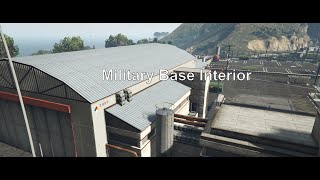
[MLO] Military Base Interior [Add-On SP / FiveM] v1.0

![Sandy Shores Desert City [Add-On SP/FiveM]](https://img.gta5-mods.com/q75-w500-h333-cfill/images/sandy-shores-desert-city-map-sp-fivem/3aa11f-mini.png "Sandy Shores Desert City [Add-On SP/FiveM]")
![Secret Base [Weed Plantation/Mafia Base][MLO] [Gta 5/Fivem]](https://img.gta5-mods.com/q75-w500-h333-cfill/images/secret-base-weed-plantation-mafia-base-mlo-gta-5-fivem/330f3d-1.jpg "Secret Base [Weed Plantation/Mafia Base][MLO] [Gta 5/Fivem]")
![Military Observatory [Add-On / FiveM]](https://img.gta5-mods.com/q75-w500-h333-cfill/images/military-observatory-fivem-gta5/6fcae4-firefox_fgwXKjKKYg.png "Military Observatory [Add-On / FiveM]")
![Secret Lab/Base Interior [Add-On SP / FiveM]](https://img.gta5-mods.com/q75-w500-h333-cfill/images/secret-lab-base-interior-fivem-gta5/5a97ed-5853f1e1920ba5303152c3a9a1ceb4d3c092337c_2_690x388.jpeg "Secret Lab/Base Interior [Add-On SP / FiveM]")


2,086
40
2,086
40
My old interior from a military-themed server. Since I don’t use it anymore, I decided to share it here. The interior includes: a canteen, a small living room, a medical area, an armory, and offices for higher ranks
Preview: https://youtu.be/CHFsCeMEJAQ
SP:
1. Put military folder here \mods\update\x64\dlcpacks
2. Open dlclist.xml and add dlcpacks:/military/ after the last line and save it
Fivem
1. unzip folder
2. Put military into your scripts folder
3. Open your server.cfg and write there ,,start military"
4. Start your server
Preview: https://youtu.be/CHFsCeMEJAQ
SP:
1. Put military folder here \mods\update\x64\dlcpacks
2. Open dlclist.xml and add dlcpacks:/military/ after the last line and save it
Fivem
1. unzip folder
2. Put military into your scripts folder
3. Open your server.cfg and write there ,,start military"
4. Start your server
First Uploaded: September 03, 2025
Last Updated: September 03, 2025
Last Downloaded: 10 hours ago
7 Comments
More mods by MrTrue:
![[MLO] Chemical Shop [Add-On / Fivem]](https://img.gta5-mods.com/q75-w500-h333-cfill/images/mlo-chemical-shop-add-on-fivem-mrtrue/f2056c-mini.png "[MLO] Chemical Shop [Add-On / Fivem]")
- Interior
5.0
3,466
44
V2 Sp Fixed
By MrTrue
My old interior from a military-themed server. Since I don’t use it anymore, I decided to share it here. The interior includes: a canteen, a small living room, a medical area, an armory, and offices for higher ranks
Preview: https://youtu.be/CHFsCeMEJAQ
SP:
1. Put military folder here \mods\update\x64\dlcpacks
2. Open dlclist.xml and add dlcpacks:/military/ after the last line and save it
Fivem
1. unzip folder
2. Put military into your scripts folder
3. Open your server.cfg and write there ,,start military"
4. Start your server
Preview: https://youtu.be/CHFsCeMEJAQ
SP:
1. Put military folder here \mods\update\x64\dlcpacks
2. Open dlclist.xml and add dlcpacks:/military/ after the last line and save it
Fivem
1. unzip folder
2. Put military into your scripts folder
3. Open your server.cfg and write there ,,start military"
4. Start your server
First Uploaded: September 03, 2025
Last Updated: September 03, 2025
Last Downloaded: 10 hours ago
 5mods on Discord

This file has been approved automatically. If you think this file should not be here for any reason please report it.
why i fall into empty
into the ground
So anyone wondering, to fix the bug where there is not any collision, you should erase anything written in the content.xml and put this :
<?xml version="1.0" encoding="utf-8"?>
<CDataFileMgr__ContentsOfDataFileXml>
<disabledFiles />
<includedXmlFiles />
<includedDataFiles />
<dataFiles>
<Item>
<filename>dlc_military:/%PLATFORM%/levels/gta5/military.rpf</filename>
<fileType>RPF_FILE</fileType>
<overlay value="false" />
<disabled value="true" />
<persistent value="true" />
</Item>
<Item>
<filename>dlc_military:/%PLATFORM%/levels/gta5/military_metadata.rpf</filename>
<fileType>RPF_FILE</fileType>
<overlay value="false" />
<disabled value="true" />
<persistent value="true" />
<contents>CONTENTS_DLC_MAP_DATA</contents>
</Item>
</dataFiles>
<contentChangeSets>
<Item>
<changeSetName>CCS_military_NG_STREAMING_MAP</changeSetName>
<filesToEnable>
<Item>dlc_military:/%PLATFORM%/levels/gta5/military.rpf</Item>
<Item>dlc_military:/%PLATFORM%/levels/gta5/military_metadata.rpf</Item>
</filesToEnable>
<executionConditions>
<activeChangesetConditions>
</activeChangesetConditions>
<genericConditions>$level=MO_JIM_L11</genericConditions>
</executionConditions>
</Item>
</contentChangeSets>
<patchFiles />
</CDataFileMgr__ContentsOfDataFileXml>
What i replaced there is instead of having
"false"
"false"
"false"
in each paragraphs where its written, i wrote
"false"
"true"
"true"
It brings back collisions, and it works in most of the add ons maps that dont have any colisions at all, i learnt this from the french riviera mod bug whitch was the same bug as this one
@SpaceMobz @MrTrue This Content.xml Works completely perfect but there’s a glitch in the entrance door of the military base interior, please can you tell the fix. Thank you
@SpaceMobz Great that fixed it!
@AXE 24 i'm really sorry, i cant really fix it. you need modify the props in the game to do such a thing, i dont have the time and its not my map so its the creator of the map that needs to update this, i dont know how to model something so i cant help