Tongva Hills Patrol Post 1.0


40
2
40
2
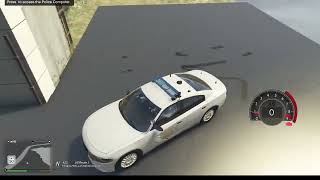
This is a map that was moved and edited to Great Ocean Hwy, Tongva Hills. I made it a Highway Patrol Station, but the texture files are included to change the signs. The original map was created by Planete's GAME and is named "Police Center Harmony" This map was edited and moved by me with the assistance of AI. I do not claim original ownership. I moved and edited props.
Original map: https://www.gta5-mods.com/maps/police-center-paleto-bay-ymap-fivem
Showcase:
https://www.youtube.com/watch?v=e5VZX3GYbNc
How to install:
(Required)
Place the 2 ymap files in Custom Maps:
Grand Theft Auto V\mods\update\x64\dlcpacks\custom_maps\dlc.rpf\x64\levels\gta5\_citye\maps\custom_maps.rpf\
(Optional)
The San Andreas Highway Patrol Tongva Hills graphic is included in the download.
To make the sign outside the building work, you will need to replace the ydr and ytd "apa_mp_h_acc_artwallm_02" files in the location below:
Grand Theft Auto V\mods\update\x64\dlcpacks\mpapartment\dlc.rpf\x64\levels\gta5\props\high\int_mp_h_props.rpf\
The apa_mp_h_acc_artwallm_02 files can be customized if you know how to use texture toolkit. You will have to replace the ydr file and ytd files to make/use your own sign.
I've also included a texture. Its 512x512 (you're welcome)
MAP EDITOR (Optional)
If you want to load some business workers and highway patrol AI peds and if you have map editor:
>Copy the tongvahillspatrolpostpeds.xml file to your GTA directory
>load map editor, load map, tongvahillspatrolpostpeds.xml
If you want to change your station to police or sheriff, using map editor to change the peds is easy so hopefully this allows for easy flexibility.
Original map: https://www.gta5-mods.com/maps/police-center-paleto-bay-ymap-fivem
Showcase:
https://www.youtube.com/watch?v=e5VZX3GYbNc
How to install:
(Required)
Place the 2 ymap files in Custom Maps:
Grand Theft Auto V\mods\update\x64\dlcpacks\custom_maps\dlc.rpf\x64\levels\gta5\_citye\maps\custom_maps.rpf\
(Optional)
The San Andreas Highway Patrol Tongva Hills graphic is included in the download.
To make the sign outside the building work, you will need to replace the ydr and ytd "apa_mp_h_acc_artwallm_02" files in the location below:
Grand Theft Auto V\mods\update\x64\dlcpacks\mpapartment\dlc.rpf\x64\levels\gta5\props\high\int_mp_h_props.rpf\
The apa_mp_h_acc_artwallm_02 files can be customized if you know how to use texture toolkit. You will have to replace the ydr file and ytd files to make/use your own sign.
I've also included a texture. Its 512x512 (you're welcome)
MAP EDITOR (Optional)
If you want to load some business workers and highway patrol AI peds and if you have map editor:
>Copy the tongvahillspatrolpostpeds.xml file to your GTA directory
>load map editor, load map, tongvahillspatrolpostpeds.xml
If you want to change your station to police or sheriff, using map editor to change the peds is easy so hopefully this allows for easy flexibility.
First Uploaded: 1 day ago
Last Updated: 1 day ago
Last Downloaded: 1 hour ago
1 Comment
More mods by GTAPatrol2026:
This is a map that was moved and edited to Great Ocean Hwy, Tongva Hills. I made it a Highway Patrol Station, but the texture files are included to change the signs. The original map was created by Planete's GAME and is named "Police Center Harmony" This map was edited and moved by me with the assistance of AI. I do not claim original ownership. I moved and edited props.
Original map: https://www.gta5-mods.com/maps/police-center-paleto-bay-ymap-fivem
Showcase:
https://www.youtube.com/watch?v=e5VZX3GYbNc
How to install:
(Required)
Place the 2 ymap files in Custom Maps:
Grand Theft Auto V\mods\update\x64\dlcpacks\custom_maps\dlc.rpf\x64\levels\gta5\_citye\maps\custom_maps.rpf\
(Optional)
The San Andreas Highway Patrol Tongva Hills graphic is included in the download.
To make the sign outside the building work, you will need to replace the ydr and ytd "apa_mp_h_acc_artwallm_02" files in the location below:
Grand Theft Auto V\mods\update\x64\dlcpacks\mpapartment\dlc.rpf\x64\levels\gta5\props\high\int_mp_h_props.rpf\
The apa_mp_h_acc_artwallm_02 files can be customized if you know how to use texture toolkit. You will have to replace the ydr file and ytd files to make/use your own sign.
I've also included a texture. Its 512x512 (you're welcome)
MAP EDITOR (Optional)
If you want to load some business workers and highway patrol AI peds and if you have map editor:
>Copy the tongvahillspatrolpostpeds.xml file to your GTA directory
>load map editor, load map, tongvahillspatrolpostpeds.xml
If you want to change your station to police or sheriff, using map editor to change the peds is easy so hopefully this allows for easy flexibility.
Original map: https://www.gta5-mods.com/maps/police-center-paleto-bay-ymap-fivem
Showcase:
https://www.youtube.com/watch?v=e5VZX3GYbNc
How to install:
(Required)
Place the 2 ymap files in Custom Maps:
Grand Theft Auto V\mods\update\x64\dlcpacks\custom_maps\dlc.rpf\x64\levels\gta5\_citye\maps\custom_maps.rpf\
(Optional)
The San Andreas Highway Patrol Tongva Hills graphic is included in the download.
To make the sign outside the building work, you will need to replace the ydr and ytd "apa_mp_h_acc_artwallm_02" files in the location below:
Grand Theft Auto V\mods\update\x64\dlcpacks\mpapartment\dlc.rpf\x64\levels\gta5\props\high\int_mp_h_props.rpf\
The apa_mp_h_acc_artwallm_02 files can be customized if you know how to use texture toolkit. You will have to replace the ydr file and ytd files to make/use your own sign.
I've also included a texture. Its 512x512 (you're welcome)
MAP EDITOR (Optional)
If you want to load some business workers and highway patrol AI peds and if you have map editor:
>Copy the tongvahillspatrolpostpeds.xml file to your GTA directory
>load map editor, load map, tongvahillspatrolpostpeds.xml
If you want to change your station to police or sheriff, using map editor to change the peds is easy so hopefully this allows for easy flexibility.
First Uploaded: 1 day ago
Last Updated: 1 day ago
Last Downloaded: 1 hour ago
 5mods on Discord

This file has been approved automatically. If you think this file should not be here for any reason please report it.