All PayPhone Locations for adopcalipt's "New Street Phone Missions" 4.0

![LSIA to vespucci Beach Bridge [XML & YMAP]](https://img.gta5-mods.com/q75-w500-h333-cfill/images/lsia-to-vespucci-beach-bridge-map-editor-xml-ymap/1687fe-1.png "LSIA to vespucci Beach Bridge [XML & YMAP]")
![Winter in GTA V 'Complete' (BETA) [OIV])](https://img.gta5-mods.com/q75-w500-h333-cfill/images/winter-in-gta-v-all-in-one-oiv-packages-v1-0/17de7e-North_Yankton_'snow-covered'_vehicles-pic2.jpg "Winter in GTA V 'Complete' (BETA) [OIV])")




1,314
9
1,314
9
All PayPhone Locations for adopcalipt's "New Street Phone Missions" by JAM102970
If you use adopcalipt's "New Street Phone Missions" mod then you'll probably gonna find this very useful. It is basically a series of text files with coordinates that I created to show all the locations of all the payphones in the game on the map, so you can find 'em easily. If you play adopcalipt's "New Street Phone Missions" you have noticed that those payphones do not show up on the map automatically by default unless you're in close proximity to one of them so in order to see a "ringing" phone you would need to constantly drive around and randomly look for them in order to start a NSPM mission, that's why I decided to find them all and save their coordinates to a text file. You will need "addon blips" by FIFASam in order for my payphone coordinates files to work.
I also modified the payphone sprites in the minimap. The default vanilla sprite looks small and dark green, I made it slightly bigger and changed the color from dark green to light green so it'll be much more visible on the map. I included an oiv package if you want to use my payphone blip.
NOTE: If you already use a mod that colorizes the blips, such as "Colored Map Blips" or other mods then if you still wanna use my modified payphone blip you will need to manually add the file in the "stand alone" folder, follow the path in instructions and add it to your minimap.ytd.
Things You Need To Know:
- My payphone blips on the map are approximate to where the actual phones are, it is not 100% spot on top of it so sometimes, the phone that's ringing, will show both my blip and vanilla's blip, side-by-side, on the map. Nevertheless the coordinates are very accurate as to where all those payphones are located.
- Sometimes there will be phones close to each other, like one across the street from the other, however only one will ring not both.
- There is a cluster of payphones close to each other in Rockfalls Hill area, see picture, those phones are not above ground, they're underground in the Subway so if you get there and don't see the phones that's because you have to go into the subway system to find them. I made a demo video on those payphones.
- There is one single payphone located behind La Spada restaurant in La Puerta, Los Santos by the marina (see pic), this payphone only spawns if you have Map Builder installed. Map Builder has a marina.ymap which places a payphone at that location. If you don't have Map Builder installed then that payphone won't spawn and you won't see it, regardless of the blip showing it on the map.
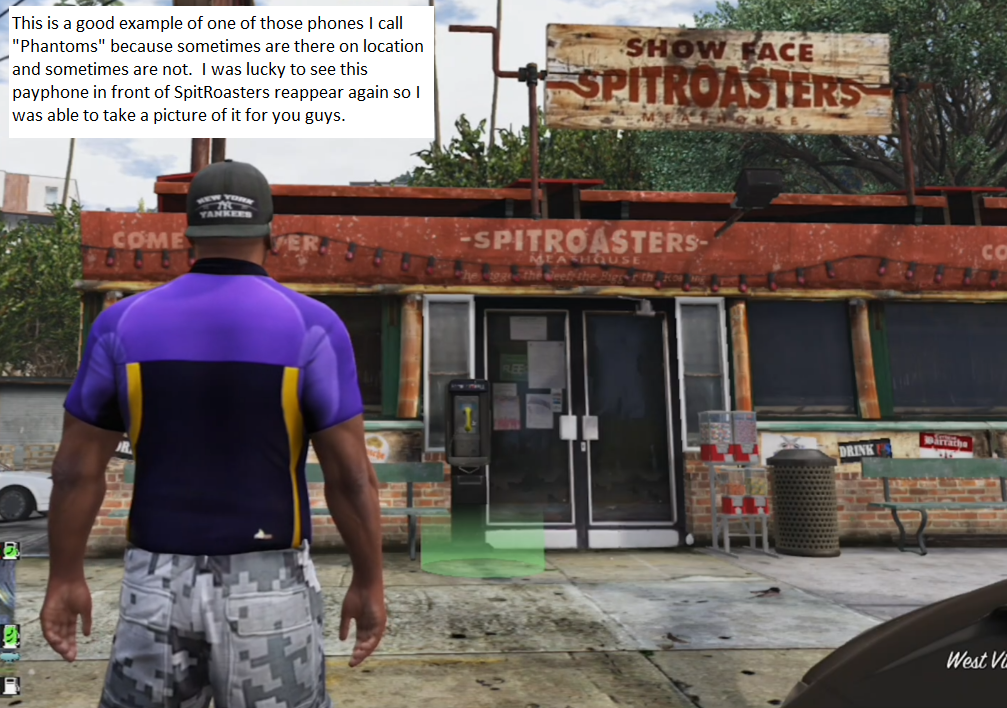
- There are a couple of payphones that sometimes are there and sometimes are not. I call them "phantom" phones because sometimes they're there and sometimes they're not. One example of a "phantom" payphone is one located in front of the Spitroasters Meathouse on Eclipse Boulevard in West Vinewood. If you go there the payphone may or may not be there.
- If you start noticing some of the other blips on the map begin to disappear you can download this mod: No more disappearing blips
- If I come across new payphones I'll keep updating this mod.
MAIN REQUIREMENTS:
Script Hook V
ScriptHookVDotNet-nightly
REQUIRED MODS:
- Obviously there's no point for my coordinates of those phones if you don't use adopcalipt's "New Street Phone Missions" mod so here's the link to that mod: https://www.gta5-mods.com/scripts/new-street-phone-missions
- You will need "Addon Blips" by FIFASam: https://www.gta5-mods.com/scripts/addon-blips
INSTALLATION:
1. First, make sure you've already installed the main files required plus the mods required, "Addon Blips" by FIFASam
2. After, you have those mods already installed, transfer all my payphone coordinates text files to the "Addon Blips" folder.
3. If you want my modified payphone blips on the map, use OpenIV to install my provided oiv package for that. Follow instructions.
4. After you've done all that, you should be able to see the blips for all the payphones in the minimap and choose which one you want to go to.
CHANGELOG:
v4.0 Discovered 12 more Payphones in Del Perro Beach (Red Desert Ave.), Stawberry, three more in West Vinewood, Vespucci Canals (Aguja St.), Vespucci (Magellan Ave.), Grand Senora Desert, Downtown Vinewood, La Mesa (Popular St.) and Paleto Bay.
v3.0 Found 8 more Payphone locations in Mirror Park, Rockford Hills Portola Drive Station, West Winewood, Pillbox Hill, LSIA New Empire Way, Del Perro Beach's Sandcastle Way, Davis Carson Ave and Del Perro Bay City Ave. Keep in mind, some of those might be what I call "Phantom" phones, which means, sometimes they may appear and be there or sometimes not.
v2.0 Added 7 more found Payphone locations in Los Santos International Airport, Grand Senora Desert, West Vinewood, Rockford Hills, Morningwood and Del Perro Red Desert Ave.
v1.0 Initial upload with 75 Payphone locations
CREDITS
* adopcalipt - "New Street Phone Missions" mod > https://www.gta5-mods.com/scripts/new-street-phone-missions
* FIFASam - "Addon Blips" mod > https://www.gta5-mods.com/scripts/addon-blips
If you have any questions ask me in comment section.
If you use adopcalipt's "New Street Phone Missions" mod then you'll probably gonna find this very useful. It is basically a series of text files with coordinates that I created to show all the locations of all the payphones in the game on the map, so you can find 'em easily. If you play adopcalipt's "New Street Phone Missions" you have noticed that those payphones do not show up on the map automatically by default unless you're in close proximity to one of them so in order to see a "ringing" phone you would need to constantly drive around and randomly look for them in order to start a NSPM mission, that's why I decided to find them all and save their coordinates to a text file. You will need "addon blips" by FIFASam in order for my payphone coordinates files to work.
I also modified the payphone sprites in the minimap. The default vanilla sprite looks small and dark green, I made it slightly bigger and changed the color from dark green to light green so it'll be much more visible on the map. I included an oiv package if you want to use my payphone blip.
NOTE: If you already use a mod that colorizes the blips, such as "Colored Map Blips" or other mods then if you still wanna use my modified payphone blip you will need to manually add the file in the "stand alone" folder, follow the path in instructions and add it to your minimap.ytd.
Things You Need To Know:
- My payphone blips on the map are approximate to where the actual phones are, it is not 100% spot on top of it so sometimes, the phone that's ringing, will show both my blip and vanilla's blip, side-by-side, on the map. Nevertheless the coordinates are very accurate as to where all those payphones are located.
- Sometimes there will be phones close to each other, like one across the street from the other, however only one will ring not both.
- There is a cluster of payphones close to each other in Rockfalls Hill area, see picture, those phones are not above ground, they're underground in the Subway so if you get there and don't see the phones that's because you have to go into the subway system to find them. I made a demo video on those payphones.
- There is one single payphone located behind La Spada restaurant in La Puerta, Los Santos by the marina (see pic), this payphone only spawns if you have Map Builder installed. Map Builder has a marina.ymap which places a payphone at that location. If you don't have Map Builder installed then that payphone won't spawn and you won't see it, regardless of the blip showing it on the map.
- There are a couple of payphones that sometimes are there and sometimes are not. I call them "phantom" phones because sometimes they're there and sometimes they're not. One example of a "phantom" payphone is one located in front of the Spitroasters Meathouse on Eclipse Boulevard in West Vinewood. If you go there the payphone may or may not be there.
- If you start noticing some of the other blips on the map begin to disappear you can download this mod: No more disappearing blips
- If I come across new payphones I'll keep updating this mod.
MAIN REQUIREMENTS:
Script Hook V
ScriptHookVDotNet-nightly
REQUIRED MODS:
- Obviously there's no point for my coordinates of those phones if you don't use adopcalipt's "New Street Phone Missions" mod so here's the link to that mod: https://www.gta5-mods.com/scripts/new-street-phone-missions
- You will need "Addon Blips" by FIFASam: https://www.gta5-mods.com/scripts/addon-blips
INSTALLATION:
1. First, make sure you've already installed the main files required plus the mods required, "Addon Blips" by FIFASam
2. After, you have those mods already installed, transfer all my payphone coordinates text files to the "Addon Blips" folder.
3. If you want my modified payphone blips on the map, use OpenIV to install my provided oiv package for that. Follow instructions.
4. After you've done all that, you should be able to see the blips for all the payphones in the minimap and choose which one you want to go to.
CHANGELOG:
v4.0 Discovered 12 more Payphones in Del Perro Beach (Red Desert Ave.), Stawberry, three more in West Vinewood, Vespucci Canals (Aguja St.), Vespucci (Magellan Ave.), Grand Senora Desert, Downtown Vinewood, La Mesa (Popular St.) and Paleto Bay.
v3.0 Found 8 more Payphone locations in Mirror Park, Rockford Hills Portola Drive Station, West Winewood, Pillbox Hill, LSIA New Empire Way, Del Perro Beach's Sandcastle Way, Davis Carson Ave and Del Perro Bay City Ave. Keep in mind, some of those might be what I call "Phantom" phones, which means, sometimes they may appear and be there or sometimes not.
v2.0 Added 7 more found Payphone locations in Los Santos International Airport, Grand Senora Desert, West Vinewood, Rockford Hills, Morningwood and Del Perro Red Desert Ave.
v1.0 Initial upload with 75 Payphone locations
CREDITS
* adopcalipt - "New Street Phone Missions" mod > https://www.gta5-mods.com/scripts/new-street-phone-missions
* FIFASam - "Addon Blips" mod > https://www.gta5-mods.com/scripts/addon-blips
If you have any questions ask me in comment section.
First Uploaded: April 28, 2025
Last Updated: July 29, 2025
Last Downloaded: 14 hours ago
8 Comments
More mods by JAM102970:
All PayPhone Locations for adopcalipt's "New Street Phone Missions" by JAM102970
If you use adopcalipt's "New Street Phone Missions" mod then you'll probably gonna find this very useful. It is basically a series of text files with coordinates that I created to show all the locations of all the payphones in the game on the map, so you can find 'em easily. If you play adopcalipt's "New Street Phone Missions" you have noticed that those payphones do not show up on the map automatically by default unless you're in close proximity to one of them so in order to see a "ringing" phone you would need to constantly drive around and randomly look for them in order to start a NSPM mission, that's why I decided to find them all and save their coordinates to a text file. You will need "addon blips" by FIFASam in order for my payphone coordinates files to work.
I also modified the payphone sprites in the minimap. The default vanilla sprite looks small and dark green, I made it slightly bigger and changed the color from dark green to light green so it'll be much more visible on the map. I included an oiv package if you want to use my payphone blip.
NOTE: If you already use a mod that colorizes the blips, such as "Colored Map Blips" or other mods then if you still wanna use my modified payphone blip you will need to manually add the file in the "stand alone" folder, follow the path in instructions and add it to your minimap.ytd.
Things You Need To Know:
- My payphone blips on the map are approximate to where the actual phones are, it is not 100% spot on top of it so sometimes, the phone that's ringing, will show both my blip and vanilla's blip, side-by-side, on the map. Nevertheless the coordinates are very accurate as to where all those payphones are located.
- Sometimes there will be phones close to each other, like one across the street from the other, however only one will ring not both.
- There is a cluster of payphones close to each other in Rockfalls Hill area, see picture, those phones are not above ground, they're underground in the Subway so if you get there and don't see the phones that's because you have to go into the subway system to find them. I made a demo video on those payphones.
- There is one single payphone located behind La Spada restaurant in La Puerta, Los Santos by the marina (see pic), this payphone only spawns if you have Map Builder installed. Map Builder has a marina.ymap which places a payphone at that location. If you don't have Map Builder installed then that payphone won't spawn and you won't see it, regardless of the blip showing it on the map.
- There are a couple of payphones that sometimes are there and sometimes are not. I call them "phantom" phones because sometimes they're there and sometimes they're not. One example of a "phantom" payphone is one located in front of the Spitroasters Meathouse on Eclipse Boulevard in West Vinewood. If you go there the payphone may or may not be there.
- If you start noticing some of the other blips on the map begin to disappear you can download this mod: No more disappearing blips
- If I come across new payphones I'll keep updating this mod.
MAIN REQUIREMENTS:
Script Hook V
ScriptHookVDotNet-nightly
REQUIRED MODS:
- Obviously there's no point for my coordinates of those phones if you don't use adopcalipt's "New Street Phone Missions" mod so here's the link to that mod: https://www.gta5-mods.com/scripts/new-street-phone-missions
- You will need "Addon Blips" by FIFASam: https://www.gta5-mods.com/scripts/addon-blips
INSTALLATION:
1. First, make sure you've already installed the main files required plus the mods required, "Addon Blips" by FIFASam
2. After, you have those mods already installed, transfer all my payphone coordinates text files to the "Addon Blips" folder.
3. If you want my modified payphone blips on the map, use OpenIV to install my provided oiv package for that. Follow instructions.
4. After you've done all that, you should be able to see the blips for all the payphones in the minimap and choose which one you want to go to.
CHANGELOG:
v4.0 Discovered 12 more Payphones in Del Perro Beach (Red Desert Ave.), Stawberry, three more in West Vinewood, Vespucci Canals (Aguja St.), Vespucci (Magellan Ave.), Grand Senora Desert, Downtown Vinewood, La Mesa (Popular St.) and Paleto Bay.
v3.0 Found 8 more Payphone locations in Mirror Park, Rockford Hills Portola Drive Station, West Winewood, Pillbox Hill, LSIA New Empire Way, Del Perro Beach's Sandcastle Way, Davis Carson Ave and Del Perro Bay City Ave. Keep in mind, some of those might be what I call "Phantom" phones, which means, sometimes they may appear and be there or sometimes not.
v2.0 Added 7 more found Payphone locations in Los Santos International Airport, Grand Senora Desert, West Vinewood, Rockford Hills, Morningwood and Del Perro Red Desert Ave.
v1.0 Initial upload with 75 Payphone locations
CREDITS
* adopcalipt - "New Street Phone Missions" mod > https://www.gta5-mods.com/scripts/new-street-phone-missions
* FIFASam - "Addon Blips" mod > https://www.gta5-mods.com/scripts/addon-blips
If you have any questions ask me in comment section.
If you use adopcalipt's "New Street Phone Missions" mod then you'll probably gonna find this very useful. It is basically a series of text files with coordinates that I created to show all the locations of all the payphones in the game on the map, so you can find 'em easily. If you play adopcalipt's "New Street Phone Missions" you have noticed that those payphones do not show up on the map automatically by default unless you're in close proximity to one of them so in order to see a "ringing" phone you would need to constantly drive around and randomly look for them in order to start a NSPM mission, that's why I decided to find them all and save their coordinates to a text file. You will need "addon blips" by FIFASam in order for my payphone coordinates files to work.
I also modified the payphone sprites in the minimap. The default vanilla sprite looks small and dark green, I made it slightly bigger and changed the color from dark green to light green so it'll be much more visible on the map. I included an oiv package if you want to use my payphone blip.
NOTE: If you already use a mod that colorizes the blips, such as "Colored Map Blips" or other mods then if you still wanna use my modified payphone blip you will need to manually add the file in the "stand alone" folder, follow the path in instructions and add it to your minimap.ytd.
Things You Need To Know:
- My payphone blips on the map are approximate to where the actual phones are, it is not 100% spot on top of it so sometimes, the phone that's ringing, will show both my blip and vanilla's blip, side-by-side, on the map. Nevertheless the coordinates are very accurate as to where all those payphones are located.
- Sometimes there will be phones close to each other, like one across the street from the other, however only one will ring not both.
- There is a cluster of payphones close to each other in Rockfalls Hill area, see picture, those phones are not above ground, they're underground in the Subway so if you get there and don't see the phones that's because you have to go into the subway system to find them. I made a demo video on those payphones.
- There is one single payphone located behind La Spada restaurant in La Puerta, Los Santos by the marina (see pic), this payphone only spawns if you have Map Builder installed. Map Builder has a marina.ymap which places a payphone at that location. If you don't have Map Builder installed then that payphone won't spawn and you won't see it, regardless of the blip showing it on the map.
- There are a couple of payphones that sometimes are there and sometimes are not. I call them "phantom" phones because sometimes they're there and sometimes they're not. One example of a "phantom" payphone is one located in front of the Spitroasters Meathouse on Eclipse Boulevard in West Vinewood. If you go there the payphone may or may not be there.
- If you start noticing some of the other blips on the map begin to disappear you can download this mod: No more disappearing blips
- If I come across new payphones I'll keep updating this mod.
MAIN REQUIREMENTS:
Script Hook V
ScriptHookVDotNet-nightly
REQUIRED MODS:
- Obviously there's no point for my coordinates of those phones if you don't use adopcalipt's "New Street Phone Missions" mod so here's the link to that mod: https://www.gta5-mods.com/scripts/new-street-phone-missions
- You will need "Addon Blips" by FIFASam: https://www.gta5-mods.com/scripts/addon-blips
INSTALLATION:
1. First, make sure you've already installed the main files required plus the mods required, "Addon Blips" by FIFASam
2. After, you have those mods already installed, transfer all my payphone coordinates text files to the "Addon Blips" folder.
3. If you want my modified payphone blips on the map, use OpenIV to install my provided oiv package for that. Follow instructions.
4. After you've done all that, you should be able to see the blips for all the payphones in the minimap and choose which one you want to go to.
CHANGELOG:
v4.0 Discovered 12 more Payphones in Del Perro Beach (Red Desert Ave.), Stawberry, three more in West Vinewood, Vespucci Canals (Aguja St.), Vespucci (Magellan Ave.), Grand Senora Desert, Downtown Vinewood, La Mesa (Popular St.) and Paleto Bay.
v3.0 Found 8 more Payphone locations in Mirror Park, Rockford Hills Portola Drive Station, West Winewood, Pillbox Hill, LSIA New Empire Way, Del Perro Beach's Sandcastle Way, Davis Carson Ave and Del Perro Bay City Ave. Keep in mind, some of those might be what I call "Phantom" phones, which means, sometimes they may appear and be there or sometimes not.
v2.0 Added 7 more found Payphone locations in Los Santos International Airport, Grand Senora Desert, West Vinewood, Rockford Hills, Morningwood and Del Perro Red Desert Ave.
v1.0 Initial upload with 75 Payphone locations
CREDITS
* adopcalipt - "New Street Phone Missions" mod > https://www.gta5-mods.com/scripts/new-street-phone-missions
* FIFASam - "Addon Blips" mod > https://www.gta5-mods.com/scripts/addon-blips
If you have any questions ask me in comment section.
First Uploaded: April 28, 2025
Last Updated: July 29, 2025
Last Downloaded: 14 hours ago
 5mods on Discord

I just uploaded update v4.0 which adds 12 more discovered Payphone locations to the map, bringing the total to 102 Payphones. If you notice some other blips begin to disappear I recommend downloading this mod > https://www.gta5-mods.com/misc/no-more-disappearing-blips. Also, you can remove some of the Payphone blips from the "AddonBlips" folder, you don't need to have all 102 Payphone blips showing on the map if you don't want to. I personally like having all those blips showing on the map because I can just go to the nearest one closest to me. Another thing you can do is edit the gameconfig.xml, using OpenIV, Search for the "RADAR_BLIP" line and increase that value. The default value for the "RADAR_BLIP" should be around 1800, you can double that if you want and that will also help with the blips from not disappearing when you have a lot of them on the map.
I got another question. How do you have the coloored map? No map mod works for me
@kxvxn_47 Sorry for the late response, you need to type @ and then my username JAM102970 so I can get notified of your comment or question otherwise I wouldn't know you asked me a question unless I come here. Anyways, the mod that I used to colorize my minimap is this one > https://www.gta5-mods.com/misc/satellite-map-16k-that-also-works-in-radar
The mode appears in the list in the pause menu, but when you hover over it, it shows outside the map.please fix it
@gtav-fan What you mean mode? You mean mod? And, what exactly is showing outside the map on your end? I don't know if I understand what you're talking about.
Muito bom esse All PayPhone Locations for adopcalipt's "New Street Phone Missions" 4.0
@JAM102970 eu queria saber se você conheceria alguma solução para esse error do AddonPeds Editor https://prnt.sc/sN3dplEvzGJ0 esse erro acontece quando enche a mais de 4 gigas de peds
@nenlee O motivo é exatamente o que está sendo informado na janela de erro: não é possível abrir o arquivo porque ele está corrompido, simples assim.