Requested PLA paint for SkylineGTRFreak's Skylaunch 1.0




120
1
120
1
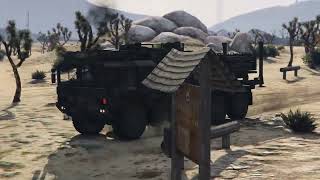
Requested PLA paint for SkylineGTRFreak's Skylaunch.
https://www.gta5-mods.com/vehicles/sky-sabre-missile-launcher-truck-british-army-add-on-animated
Once installed with their instructions, open the dlc.rpf with OpenIV
Follow this path to the file to overwrite:
...\GTAV\mods\update\x64\dlcpacks\skylaunch\dlc.rpf\x64\levels\gta5\vehicles\vehicles.rpf\skylaunch.ytd
If you wish to retain the original livery pack, while in OpenIV, extract the file skylaunch.ytd. I typically extract the original .ytd to the same folder as the dlc.rpf and rename it to origskylaunch.ytd.
When ready to overwrite with one of the provided liveries, toggle "Edit mode", top right button, and drag mq25.ytd from the extracted zip file and drop here:
...\GTAV\mods\update\x64\dlcpacks\skylaunch\dlc.rpf\x64\levels\gta5\vehicles\vehicles.rpf\skylaunch.ytd
Just to confirm the livery, I'd click on the skylaunch.yft or skylaunch_hi.yft file to open the OpenIV Model Viewer to see what the model will look like with the new livery.
Once satisfied, close the model viewer and run GTAV and spawn skylaunch with the trainer of your choice.
I've included my work files in case you'd like to use it as a starting point for your own project.
Enjoy,
Gillman
https://www.gta5-mods.com/vehicles/sky-sabre-missile-launcher-truck-british-army-add-on-animated
Once installed with their instructions, open the dlc.rpf with OpenIV
Follow this path to the file to overwrite:
...\GTAV\mods\update\x64\dlcpacks\skylaunch\dlc.rpf\x64\levels\gta5\vehicles\vehicles.rpf\skylaunch.ytd
If you wish to retain the original livery pack, while in OpenIV, extract the file skylaunch.ytd. I typically extract the original .ytd to the same folder as the dlc.rpf and rename it to origskylaunch.ytd.
When ready to overwrite with one of the provided liveries, toggle "Edit mode", top right button, and drag mq25.ytd from the extracted zip file and drop here:
...\GTAV\mods\update\x64\dlcpacks\skylaunch\dlc.rpf\x64\levels\gta5\vehicles\vehicles.rpf\skylaunch.ytd
Just to confirm the livery, I'd click on the skylaunch.yft or skylaunch_hi.yft file to open the OpenIV Model Viewer to see what the model will look like with the new livery.
Once satisfied, close the model viewer and run GTAV and spawn skylaunch with the trainer of your choice.
I've included my work files in case you'd like to use it as a starting point for your own project.
Enjoy,
Gillman
First Uploaded: 10 days ago
Last Updated: 10 days ago
Last Downloaded: 1 day ago
1 Comment
More mods by Gillman:
Requested PLA paint for SkylineGTRFreak's Skylaunch.
https://www.gta5-mods.com/vehicles/sky-sabre-missile-launcher-truck-british-army-add-on-animated
Once installed with their instructions, open the dlc.rpf with OpenIV
Follow this path to the file to overwrite:
...\GTAV\mods\update\x64\dlcpacks\skylaunch\dlc.rpf\x64\levels\gta5\vehicles\vehicles.rpf\skylaunch.ytd
If you wish to retain the original livery pack, while in OpenIV, extract the file skylaunch.ytd. I typically extract the original .ytd to the same folder as the dlc.rpf and rename it to origskylaunch.ytd.
When ready to overwrite with one of the provided liveries, toggle "Edit mode", top right button, and drag mq25.ytd from the extracted zip file and drop here:
...\GTAV\mods\update\x64\dlcpacks\skylaunch\dlc.rpf\x64\levels\gta5\vehicles\vehicles.rpf\skylaunch.ytd
Just to confirm the livery, I'd click on the skylaunch.yft or skylaunch_hi.yft file to open the OpenIV Model Viewer to see what the model will look like with the new livery.
Once satisfied, close the model viewer and run GTAV and spawn skylaunch with the trainer of your choice.
I've included my work files in case you'd like to use it as a starting point for your own project.
Enjoy,
Gillman
https://www.gta5-mods.com/vehicles/sky-sabre-missile-launcher-truck-british-army-add-on-animated
Once installed with their instructions, open the dlc.rpf with OpenIV
Follow this path to the file to overwrite:
...\GTAV\mods\update\x64\dlcpacks\skylaunch\dlc.rpf\x64\levels\gta5\vehicles\vehicles.rpf\skylaunch.ytd
If you wish to retain the original livery pack, while in OpenIV, extract the file skylaunch.ytd. I typically extract the original .ytd to the same folder as the dlc.rpf and rename it to origskylaunch.ytd.
When ready to overwrite with one of the provided liveries, toggle "Edit mode", top right button, and drag mq25.ytd from the extracted zip file and drop here:
...\GTAV\mods\update\x64\dlcpacks\skylaunch\dlc.rpf\x64\levels\gta5\vehicles\vehicles.rpf\skylaunch.ytd
Just to confirm the livery, I'd click on the skylaunch.yft or skylaunch_hi.yft file to open the OpenIV Model Viewer to see what the model will look like with the new livery.
Once satisfied, close the model viewer and run GTAV and spawn skylaunch with the trainer of your choice.
I've included my work files in case you'd like to use it as a starting point for your own project.
Enjoy,
Gillman
First Uploaded: 10 days ago
Last Updated: 10 days ago
Last Downloaded: 1 day ago
 5mods on Discord

This file has been approved automatically. If you think this file should not be here for any reason please report it.